Financial Model & KPI Dashboard for a Steel Fabrication Company
A “Financial X-Ray” Excel model that turns a fabrication company’s monthly P&L into margins, cash flow, a weighted sales pipeline, a what-if simulator and a 7-chart dashboard.
Client name, branding and live link are withheld for privacy, and identifying details are removed from screenshots. Happy to walk through this project on a call.
Overview
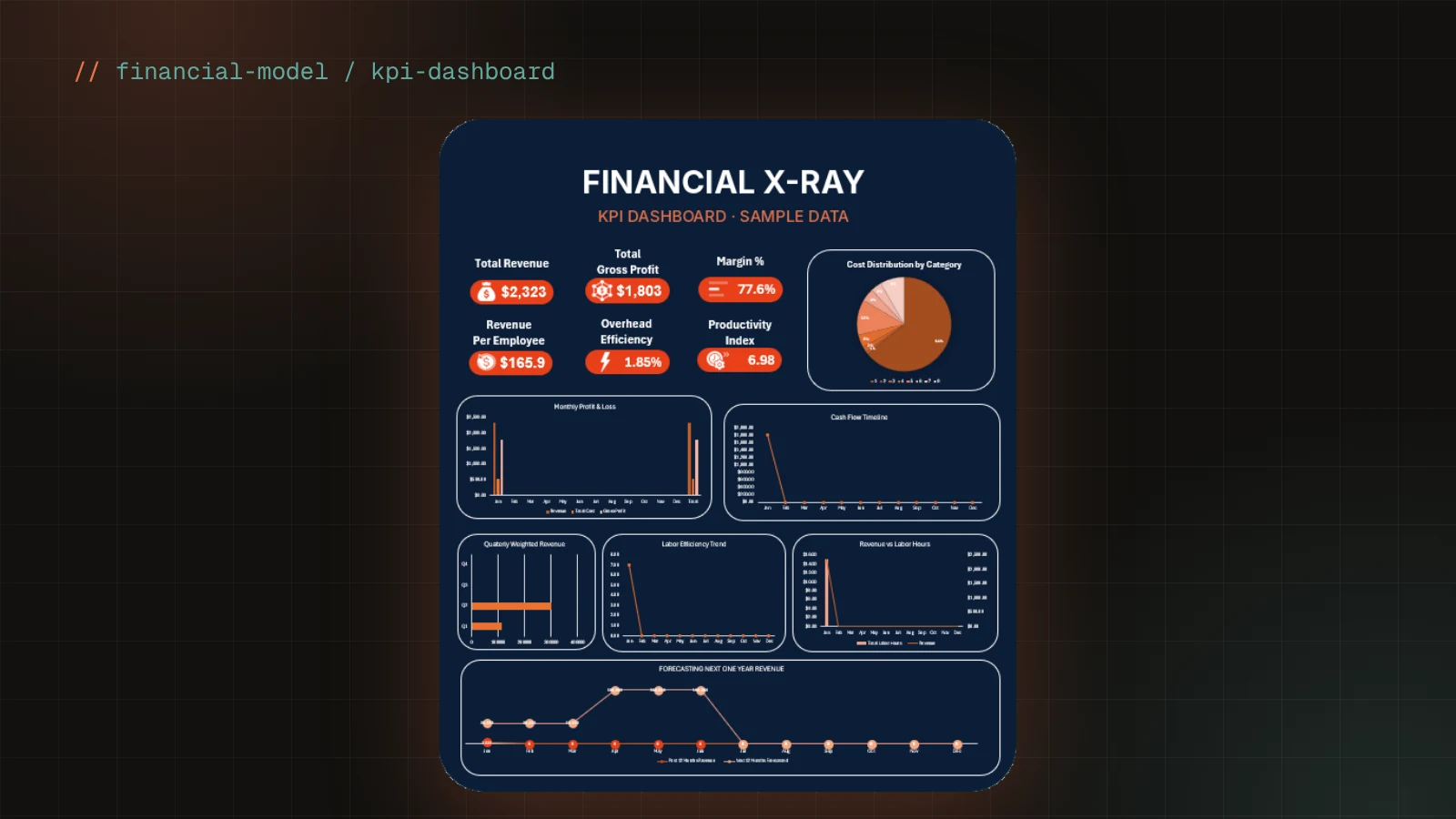
A financial decision-support model built in Excel for a steel fabrication and installation company with three divisions — shop fabrication, field installation and admin/HQ. Starting from the company’s Profit & Loss data across six cost categories, the model calculates monthly performance, forecasts the next 12 months, values the sales pipeline by win probability, and lets management test “what if” changes to labor efficiency, material costs and headcount — all summarised on one dashboard.
The Problem
The company had P&L reports but no single view of how each month, each project and each cost category affected its margins. Management wanted to hit a 28–30% gross margin and 20% net margin, track labor productivity against an 85% target, see which bids in the pipeline really mattered, and understand how changes in labor efficiency or material prices would hit project and company margins before they happened.
Solution
Structured the workbook as a small data pipeline: clean monthly inputs and cost codes feed a calculations sheet, which drives the forecast, pipeline and dashboard. Pipeline bids are weighted by win probability and summed by quarter; project labor cost is built from shop and field hours at their hourly rates. A what-if simulator exposes labor efficiency, material cost change and employee count as named inputs that flow into every project’s adjusted cost, profit and margin. A long-format data table makes the same numbers ready for Power BI.
Architecture
Key Features
- →Monthly breakdown of revenue and costs across labor, material, consumables, equipment, maintenance and overhead
- →Calculated gross profit, margin %, breakeven revenue, cash flow and labor efficiency for every month
- →Project pipeline: bid value × win probability = weighted revenue, rolled up by quarter
- →Project cost build-up from shop and field hours at their hourly rates
- →What-if simulator for labor efficiency, material cost change and headcount, linked to project margins through named ranges
- →Dashboard with 7 charts: monthly P&L, cash flow timeline, labor efficiency trend, cost distribution, revenue vs labor hours, quarterly weighted revenue and a 12-month forecast
- →KPIs for total revenue, gross profit, margin % and revenue per employee
- →Long-format data table prepared for Power BI
Tech Stack
Key Decisions & Challenges
Making the simulator affect everything
A what-if tool is only useful if one change flows through the whole model. Simulator inputs are exposed as named ranges (LaborEff, MatChange) so every project’s adjusted cost, profit and margin update instantly when a value changes.
Valuing an uncertain pipeline
A $500k bid with a 20% chance shouldn’t count the same as a won contract. Each bid is weighted by its win probability and grouped by quarter, giving a realistic revenue outlook instead of an optimistic total.
Breakeven with mixed cost types
Breakeven revenue was calculated by separating fixed costs (maintenance and overhead) from variable costs (labor, material, consumables, equipment) as a share of revenue, so the business can see the minimum monthly revenue needed to cover its costs.
Lessons Learned
- →Separating inputs, calculations and outputs makes a spreadsheet as maintainable as code
- →Management decisions need a few clear KPIs, not every number at once
Results
Delivered a working financial model and dashboard covering every requirement in the client’s brief: monthly category breakdown, project-level visibility, weighted pipeline forecast, adjustable efficiency and cost parameters, and KPI tracking for margin, cash flow and revenue per employee.
What I'd Do Differently
- ↻Convert the pipeline into an Excel Table so formulas only exist on rows with data — keeping the file small and fast as it grows
Related Projects
Need something similar?
I can build a system like this for your business — tell me what you need and I'll reply with a plan and a quote.